Run your Businessfront from one place.
Sell your services and products on Alawa. Confirm bookings with a tap, keep your listings fresh, and get paid — all from one dashboard.
- active vendors
- 2,400+
- active vendors
- average vendor rating
- 4.8★
- average vendor rating
- customers
- 50,000+
- customers
What we're about
A marketplace that sends customers your way
Renmo Technologies built Alawa so local businesses can reach the people already spending through the WorkBenefits app — and get paid reliably for every booking they honour.
Customers come to you
Alawa is the marketplace inside the WorkBenefits app. Customers browse it to book services and order products — and spend their Alawa wallet with vendors like you.
Your own Businessfront
Get a link and QR code that open a page with only your business on it. Share it on WhatsApp, Instagram or a sign at your till — no app download needed to book.
Paid for what you deliver
Every booking is confirmed in person with the customer's 6-digit code. Once confirmed, it's yours — straight to your earnings.
Built for services and products
Beauty & hair
Food & catering
Fitness & wellness
Jewellery & fashion
Bakeries
Home & décor
Salons & stylists
Transport
And so much more!
If people book it or buy it, you can sell it!
- Cleaning
- Events & décor
- Photography
- Spa & massage
- Tailoring
- Laundry
- Tutoring
- Car care
How it works
From sign-up to your first earnings
Most vendors are set up in a few minutes.
- 1
Create your account
Sign up with your phone number and a one-time code. Takes about a minute.
- 2
Add what you sell
List services with a duration or products with stock, prices and photos.
- 3
Go live and share
Add your location and where you want to be paid. Customers find you in the app and through your link.
- 4
Confirm each booking
When the customer arrives or collects, type the 6-digit code from their app.
- 5
Get paid
Confirmed bookings are paid out to your MoMo or bank account.
Your vendor dashboard
Everything you need to run your business!
One dashboard for your whole business — on your phone or computer. Sign up to see it all!
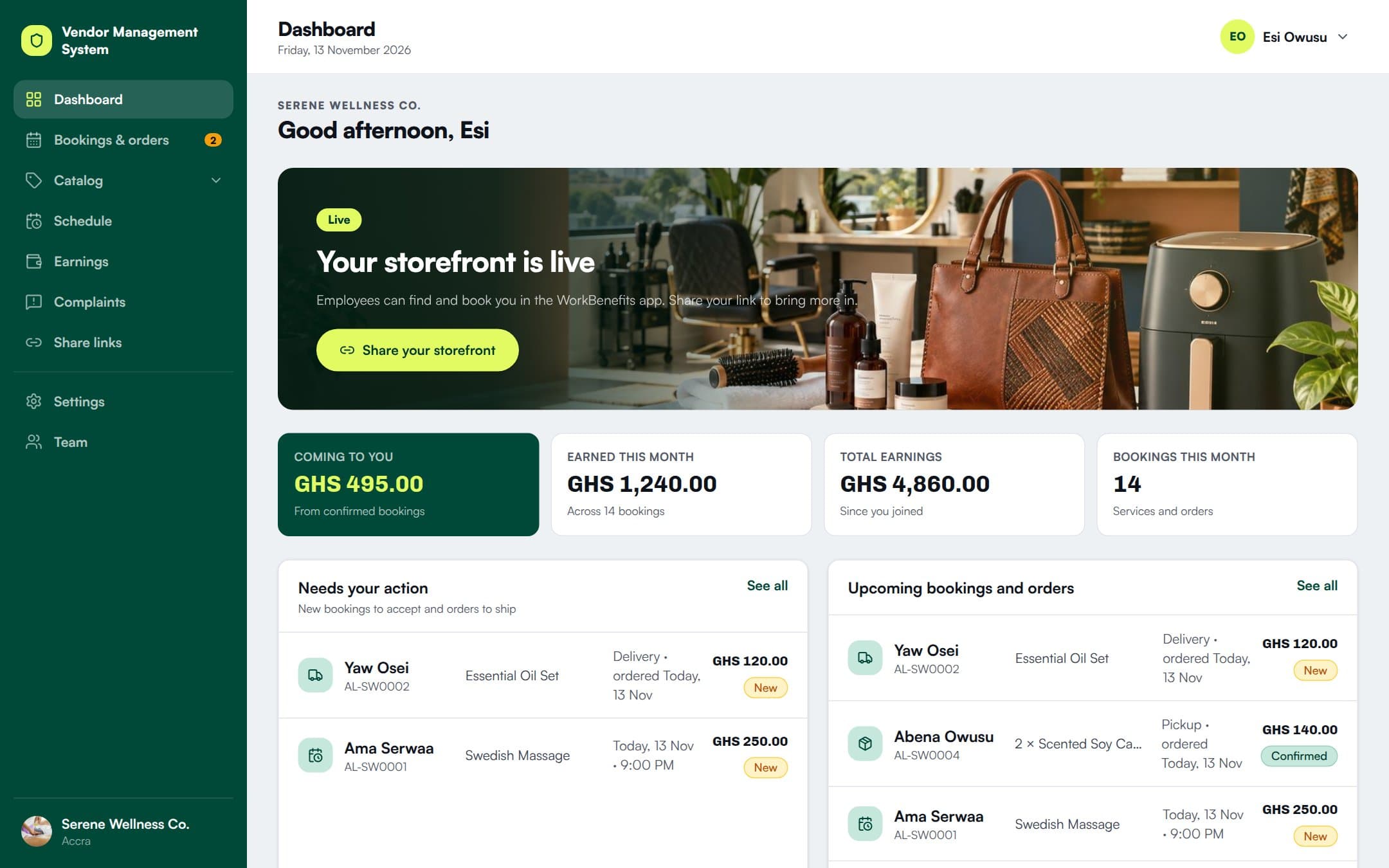
- Instant booking alertsNever miss a customer!
- Bookings & ordersEverything that's coming in, in one place.
- Redeem with a codeConfirm customers in seconds.
- CatalogShow off your services and products.
- Schedule & time offYou decide when you're open.
- EarningsAlways know what you've made.
- Team & branchesBring your whole team on board.
- ComplaintsSort issues fast and keep customers happy.
- Share links & QR codesBring your own customers along.
Fees & earnings
You only pay when you get paid.
Commission comes off fulfilled bookings and orders — never off cancelled ones.
Commission
Agreed upfront
Set in your commission agreement and shown on every earning
Sign-up
Reviewed
Renmo Technologies verifies you with your Ghana Card and a selfie — no paperwork
Earnings
Direct
to your MoMo or bank account
- No commission on cancelled bookings
- Customers are refunded by WorkBenefits
- Download your earnings statements anytime
FAQ
Questions vendors ask us
How much does it cost to sell?
We take a platform commission on each fulfilled booking or order, at the rate in your commission agreement. It's deducted automatically before the rest is added to your earnings, and every booking shows the commission taken.
When do I get paid?
Customers pay when they book, and we hold the money safely. Once you've completed the service or order and no issue is reported within the window in the terms (usually 24–72 hours), it's released to the MoMo (MTN, Telecel, AirtelTigo) or bank account you set up. You can download a statement of your earnings anytime.
Do my customers need the app?
Not to book you. Anyone can book or order from your Businessfront link in their browser. Customers who use the WorkBenefits app can also find you while browsing the marketplace and pay from their wallet.
What happens if I need to cancel?
Cancelling more than 24 hours before a booking is free; later cancellations may carry a charge. Cancel from the booking with a short reason the customer will see — WorkBenefits refunds them and the slot or stock is freed up. Once a delivery has shipped it can't be cancelled. The full rules are in the terms and conditions you accept when you sign up.
What can I sell?
Services people book — at your shop (bookings and walk-ins) or as a home service at the customer's place — across beauty, wellness, fitness, cleaning, events and more. And products people order for pickup or delivery. You can sell both from one account.
Do you handle delivery or home services?
No — both are on you. Use your own courier or deliver yourself, and travel to customers for home services. For delivery orders, add the tracking reference when you mark the order shipped.
Ready to take bookings?
Create your vendor account in a minute. Add your first listing today.